
Skip to product information

View full item details


TP-Link OC220 Omada Hardware Controller
Description
TP-Link OC220 Omada Hardware Controller
I/O: 2 Gigabit Ethernet Ports, 1 USB 2.0 Port, 1 Micro USB Port
Dimensions: (W x D x H) 3.93.91.0 in
Power Supply: 802.3af PoE, Micro USB (DC 5V/Minimum 1A)
OC220
I/O: 2 Gigabit Ethernet Ports, 1 USB 2.0 Port, 1 Micro USB Port
Dimensions: (W x D x H) 3.93.91.0 in
Power Supply: 802.3af PoE, Micro USB (DC 5V/Minimum 1A)
OC220
Delivery
Australia
Standard Shipping 4-7 business days: AU $8.95*
Express Shipping 1-3 business days: AU $15*
International Shipping
New Zealand 9-12 business days: AU$21*
*During peak promotional periods, please allow additional time for your order dispatch.
Learn more
Returns
While we can’t offer a refund or replacement if you simply change your mind, we’re here to help if your item has a problem under Australian Consumer Law. You may be entitled to a refund or exchange if an item has a major problem. This is when the item:
- has a problem that would have stopped someone from buying the item if they had known about it
- is unsafe
- is significantly different from the sample or description
- doesn't do what we said it would, or what you asked for and can't be easily fixed
If the problem is not major, we will repair the item within a reasonable time. If it can’t be repaired in a reasonable time, we’ll offer a suitable resolution such as a refund or replacement. Please keep your proof of purchase — e.g. your receipt.
Read more


Description
TP-Link OC220 Omada Hardware Controller
I/O: 2 Gigabit Ethernet Ports, 1 USB 2.0 Port, 1 Micro USB Port
Dimensions: (W x D x H) 3.93.91.0 in
Power Supply: 802.3af PoE, Micro USB (DC 5V/Minimum 1A)
OC220
View Full Details
I/O: 2 Gigabit Ethernet Ports, 1 USB 2.0 Port, 1 Micro USB Port
Dimensions: (W x D x H) 3.93.91.0 in
Power Supply: 802.3af PoE, Micro USB (DC 5V/Minimum 1A)
OC220
Delivery
Australia
Standard Shipping 4-7 business days: AU $8.95*
Express Shipping 1-3 business days: AU $15*
International Shipping
New Zealand 9-12 business days: AU$21*
*During peak promotional periods, please allow additional time for your order dispatch.
Learn more
Returns
While we can’t offer a refund or replacement if you simply change your mind, we’re here to help if your item has a problem under Australian Consumer Law. You may be entitled to a refund or exchange if an item has a major problem. This is when the item:
- has a problem that would have stopped someone from buying the item if they had known about it
- is unsafe
- is significantly different from the sample or description
- doesn't do what we said it would, or what you asked for and can't be easily fixed
If the problem is not major, we will repair the item within a reasonable time. If it can’t be repaired in a reasonable time, we’ll offer a suitable resolution such as a refund or replacement. Please keep your proof of purchase — e.g. your receipt.
Read more
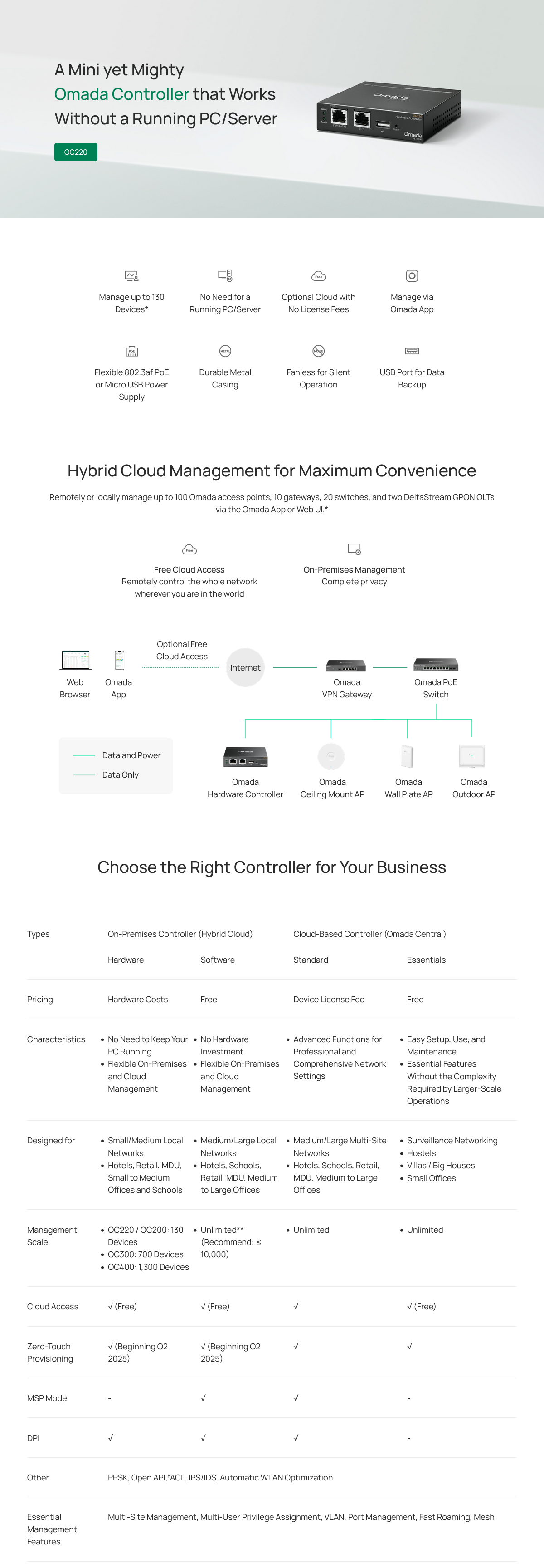
- Centralised Management: Supports up to 100 Omada access points, 10 Omada gateways, a maximum of 20 Omada switches, and a maximum of 2 certain DeltaStream GPON OLTs*
- Free Cloud Access: Manage and monitor with the Omada app or Web UI from anywhere, anytime.
- On-Premises Management: Locally monitor and manage devices with the ultimate stability and complete privacy.
- Hardware Design for Businesses: Features a powerful chipset, durable metal casing, USB 2.0 port for data backup, and two Gigabit Ethernet ports.
- Flexible Deployment: Powered via 802.3af PoE or Micro USB (DC 5V/Minimum 1A) with a compact desktop or wall mount installation.
| HARDWARE FEATURES | |
|---|---|
| Interface | • 2× Gigabit Ethernet Ports • 1× USB 2.0 Port • 1× Micro USB Port |
| Power Supply | • 802.3af PoE • Micro USB(DC 5V/Minimum 1A) |
| Dimensions ( W x D x H ) | 3.9×3.9×1.0 in (100×98×25 mm) |
| Management Features | |
|---|---|
| Omada App | Yes |
| Centralized Management | • 100 Omada access points • 10 Omada gateways • A maximum of 20 Omada switches* • A maximum of two select DeltaStream GPON OLTs* |
| Cloud Access | Yes |
| L3 Management | Yes |
| Multi-site Management | Yes |
| Management Features | • Automatic Device Discovery • Batch Configuration • Batch Firmware Upgrading • Intelligent Network Monitoring • Abnormal Event Warnings • Unified Configuration • Reboot Schedule • Captive Portal Configuration |
| OTHERS | |
|---|---|
| Certification | CE, FCC, RoHS |
| Package Content | • Omada Hardware Controller OC220 • Quick Installation Guide • RJ45 Ethernet Cable |
| System Requirements | Windows 7/8/10/11, Vista™, XP or MAC® OS, NetWare®, UNIX® or Linux |
| Environment | • Operating Temperature: -5–50 ? (23–122 ?) • Storage Temperature: -40–70 ? (-40–158 ?) • Operating Humidity: 10–90% RH non-condensing • Storage Humidity: 5–90% RH non-condensing |
Loading reviews...
Loading reviews...
