
Skip to product information

View full item details
 Awaiting stock


Awaiting stock

Thermal Grizzly WireView Pro II GPU Power Meter 12V-2x6 - Reversed - Black


Thermal Grizzly WireView Pro II GPU Power Meter 12V-2x6 - Reversed - Black
Description
• Thermal Grizzly WireView Pro II GPU Power Meter 12V-2x6 Reversed
• Colour: Black
• Connector type: 2-pin JST PH 1.0mm (motherboard power button), 2x2-pin JST PH 2.0mm (temperature sensors, 10k NTC, B3435 Standard), 12V-2x6-Pin, USB-C
• Display: 320x170 pixel TFT-IPS colour display
• Material: Aluminum
• TG-WV-P2-H19R
• Colour: Black
• Connector type: 2-pin JST PH 1.0mm (motherboard power button), 2x2-pin JST PH 2.0mm (temperature sensors, 10k NTC, B3435 Standard), 12V-2x6-Pin, USB-C
• Display: 320x170 pixel TFT-IPS colour display
• Material: Aluminum
• TG-WV-P2-H19R
$229.00
Sale price
$229.00


BANK TRANSFER (EFT)

$229.00
Sale price
$229.00
Accepted payment methods


Description
• Thermal Grizzly WireView Pro II GPU Power Meter 12V-2x6 Reversed
• Colour: Black
• Connector type: 2-pin JST PH 1.0mm (motherboard power button), 2x2-pin JST PH 2.0mm (temperature sensors, 10k NTC, B3435 Standard), 12V-2x6-Pin, USB-C
• Display: 320x170 pixel TFT-IPS colour display
• Material: Aluminum
• TG-WV-P2-H19R
View Full Details
• Colour: Black
• Connector type: 2-pin JST PH 1.0mm (motherboard power button), 2x2-pin JST PH 2.0mm (temperature sensors, 10k NTC, B3435 Standard), 12V-2x6-Pin, USB-C
• Display: 320x170 pixel TFT-IPS colour display
• Material: Aluminum
• TG-WV-P2-H19R

Important Information on Compatibility Checking!
Before purchasing a WireView Pro II, it should be verified whether the graphics card in use is compatible. To do so, the following steps can be carried out:
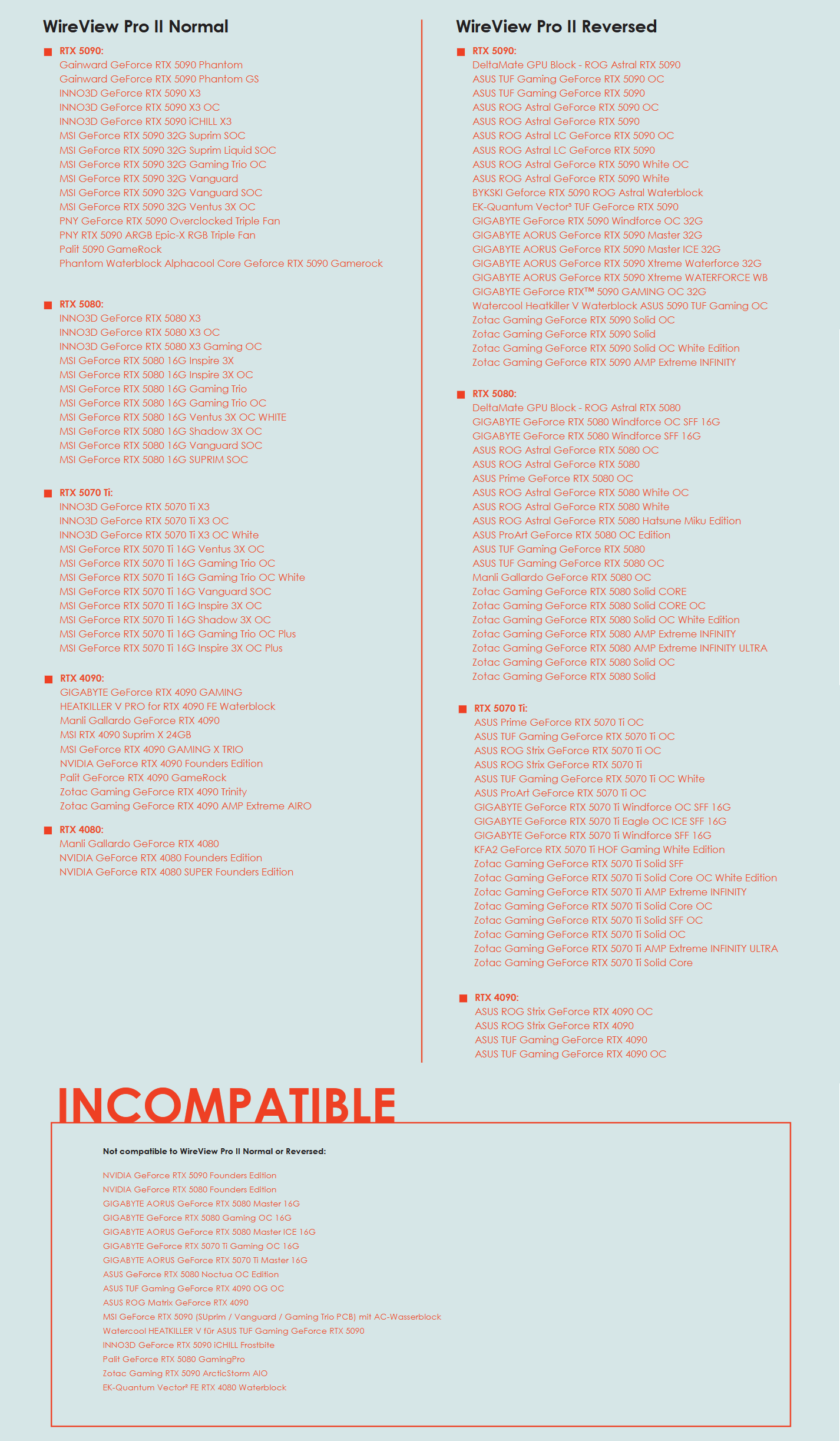
- Check the compatibility list. The compatibility list is designed based on a horizontal installation of the graphics card with the power cable routed toward the bottom of the case.
- Using the technical drawing in the download section of the product page, check whether the WireView Pro II is compatible with the graphics card, the case (clearances to the side panel, etc.), and, if applicable, the CPU cooler.
The WireView Pro II is available in two variants. The choice of variant primarily depends on the routing of the power cable from the power supply, as the display on the WireView Pro II can be rotated by 180° in the settings.
Depending on the orientation of the 12VHWPR or 12V-2x6 connector on the graphics card, either the “Normal (N)” or the “Reversed (R)” variant is required to route the power cable toward the graphics card cooler. The description assumes a horizontal installation of the graphics card with the power cable routed toward the bottom of the case.
Loading reviews...
Loading reviews...
