
Skip to product information

View full item details


StarTech USB-C to VGA Adapter - with Presentation Mode Switch - 1920x1200


StarTech USB-C to VGA Adapter - with Presentation Mode Switch - 1920x1200
Description
Use this unique adapter to prevent your USB Type-C computer from entering power save mode during presentations
Works with USB C devices like MacBooks with USB Type C Lenovo P70 HP Spectre x360 & Asus ROG G752
Works with VGA TVs & projectors
Presentation mode ensures your video output is not interrupted by your computer’s power saving modes
Resolutions up to 1920x1200
USB C to VGA / USB Type C to VGA / USB Type C to VGA adapter / USB C adapter / Connect laptop to TV
Works with USB C devices like MacBooks with USB Type C Lenovo P70 HP Spectre x360 & Asus ROG G752
Works with VGA TVs & projectors
Presentation mode ensures your video output is not interrupted by your computer’s power saving modes
Resolutions up to 1920x1200
USB C to VGA / USB Type C to VGA / USB Type C to VGA adapter / USB C adapter / Connect laptop to TV
Delivery
Australia
Standard Shipping 4-7 business days: AU $8.95*
Express Shipping 1-3 business days: AU $15*
International Shipping
New Zealand 9-12 business days: AU$21*
*During peak promotional periods, please allow additional time for your order dispatch.
Learn more
Returns
While we can’t offer a refund or replacement if you simply change your mind, we’re here to help if your item has a problem under Australian Consumer Law. You may be entitled to a refund or exchange if an item has a major problem. This is when the item:
- has a problem that would have stopped someone from buying the item if they had known about it
- is unsafe
- is significantly different from the sample or description
- doesn't do what we said it would, or what you asked for and can't be easily fixed
If the problem is not major, we will repair the item within a reasonable time. If it can’t be repaired in a reasonable time, we’ll offer a suitable resolution such as a refund or replacement. Please keep your proof of purchase — e.g. your receipt.
Read more
$65.95
Sale price
$65.95


BANK TRANSFER (EFT)

$65.95
Sale price
$65.95
Accepted payment methods


Description
Use this unique adapter to prevent your USB Type-C computer from entering power save mode during presentations
Works with USB C devices like MacBooks with USB Type C Lenovo P70 HP Spectre x360 & Asus ROG G752
Works with VGA TVs & projectors
Presentation mode ensures your video output is not interrupted by your computer’s power saving modes
Resolutions up to 1920x1200
USB C to VGA / USB Type C to VGA / USB Type C to VGA adapter / USB C adapter / Connect laptop to TV
View Full Details
Works with USB C devices like MacBooks with USB Type C Lenovo P70 HP Spectre x360 & Asus ROG G752
Works with VGA TVs & projectors
Presentation mode ensures your video output is not interrupted by your computer’s power saving modes
Resolutions up to 1920x1200
USB C to VGA / USB Type C to VGA / USB Type C to VGA adapter / USB C adapter / Connect laptop to TV
Delivery
Australia
Standard Shipping 4-7 business days: AU $8.95*
Express Shipping 1-3 business days: AU $15*
International Shipping
New Zealand 9-12 business days: AU$21*
*During peak promotional periods, please allow additional time for your order dispatch.
Learn more
Returns
While we can’t offer a refund or replacement if you simply change your mind, we’re here to help if your item has a problem under Australian Consumer Law. You may be entitled to a refund or exchange if an item has a major problem. This is when the item:
- has a problem that would have stopped someone from buying the item if they had known about it
- is unsafe
- is significantly different from the sample or description
- doesn't do what we said it would, or what you asked for and can't be easily fixed
If the problem is not major, we will repair the item within a reasonable time. If it can’t be repaired in a reasonable time, we’ll offer a suitable resolution such as a refund or replacement. Please keep your proof of purchase — e.g. your receipt.
Read more
This is no ordinary video adapter. Yes, it enables you to connect the USB-C™ port on your computer to a VGA display or projector, but it also features a unique Presentation Mode switch. When you turn on this switch, the adapter prevents your computer from launching its screen saver, going to sleep or entering power save mode. The adapter ensures that your screen will always stay on, making it the perfect USB-C video adapter for any presentation or meeting.
Keep your audience engaged with your presentation
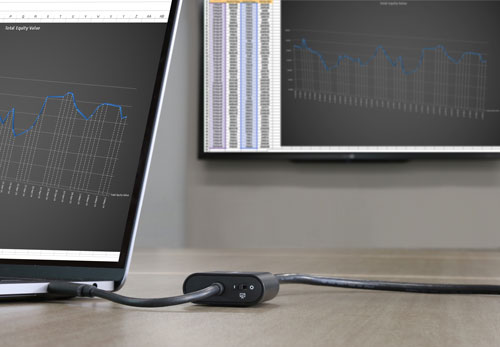
When you deliver a presentation, your goal is to engage with your audience, not your computer. But, if you don't move your mouse soon enough, or change your power settings, your screen goes black due to inactivity while you're addressing the audience. This can be a major distraction when you're trying to focus on the message you're communicating.
This adapter prevents screen disruptions with Presentation Mode, a unique feature that automatically initiates occasional cursor movement to prevent your computer’s power settings from interrupting your presentation. It’s perfect for sharing websites, drawings, spreadsheets, PDFs or slide shows during your meeting.
Turn Presentation Mode on or off
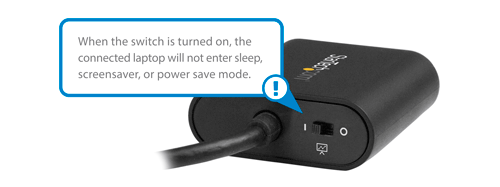
You can turn Presentation Mode on or off, depending on your application. Turn it on when you're in the boardroom and want your screen to stay on, and turn it off when you’re using the adapter at your workspace or office desk, to enable your computer's original power settings to take effect. Using the toggle switch is easy, and saves you the hassle of constantly making adjustments in your operating system settings.
Hassle-free setup and operation on Mac and PC
To ensure easy operation and installation, this unique adapter is natively supported on Windows® and Mac computers. It’s easy to connect the adapter using the versatile USB Type-C™ port on your computer. The reversible USB-C connector means you will always plug it in correctly on your first try, saving you the hassle and distraction of repeatedly attempting to connect your laptop to a display or projector.
Crystal-clear picture quality
The adapter supports video resolutions up to 1920x1200 or 1080p. You’ll be surprised at the picture quality the adapter provides, even when you connect it to a legacy VGA projector or television. The adapter harnesses the video capabilities that are built into your USB Type-C connection to deliver every detail in stunning high-definition.
The CDP2VGASA is backed by a 2-year StarTech.com warranty and free lifetime technical support.
| Physical Characteristics | |
| Accent Color | Black |
| Performance | |
| Wide Screen Supported | Yes |
| Supported Resolutions | 1024 x 768 1280 x 720 1920 x 1080 1920 x 1200 2048 x 1280 |
| Maximum Analog Resolutions | 2048 x 1280, 1920 x 1200 @ 60hz |
| Packaging Information | |
| Shipping (Package) Weight | 0.1 kg [0.1 lb] |
| Hardware | |
| Ports | 1 |
| AV Output | VGA |
| AV Input | USB Type-C |
| Environmental | |
| Storage Temperature | 5°C to 35°C (41°F to 95°F) |
| Operating Temperature | 5°C to 35°C (41°F to 95°F) |
| Humidity | 25% to 85% RH Non-Condensing |
| Connector(s) | |
| Connector B | VGA (15 pin, High Density D-Sub) Female Output |
| Connector A | USB-C (24 pin) DisplayPort Alt Mode Male Input |
| Physical Characteristics | |
| Cable Length | 95 mm [3.7 in] |
| Color | Black |
| Product Height | 15 mm [0.6 in] |
| Product Length | 186 mm [7.3 in] |
| Product Weight | 29 g [1 oz] |
| Product Width | 43 mm [1.7 in] |
| Special Notes / Requirements | |
| System and Cable Requirements | Your USB-C port must support DisplayPort over USB-C (DP Alt mode) in order to work with this adapter. |
| What's in the Box | |
| Included in Package | quick-start guide |
| USB-C to VGA video adapter | |
Presentation mode ensures your video output is not interrupted by your computers power saving modes
Resolutions up to 1920x1200
USB C to VGA / USB Type C to VGA / USB Type C to VGA adapter / USB C adapter / Connect laptop to TV
Use this unique adapter to prevent your USB Type-C computer from entering power save mode during presentations
Works with USB C devices like MacBooks with USB Type C Lenovo P70 HP Spectre x360 & Asus ROG G752
Works with VGA TVs & projectors
Resolutions up to 1920x1200
USB C to VGA / USB Type C to VGA / USB Type C to VGA adapter / USB C adapter / Connect laptop to TV
Use this unique adapter to prevent your USB Type-C computer from entering power save mode during presentations
Works with USB C devices like MacBooks with USB Type C Lenovo P70 HP Spectre x360 & Asus ROG G752
Works with VGA TVs & projectors
Loading reviews...
Loading reviews...
